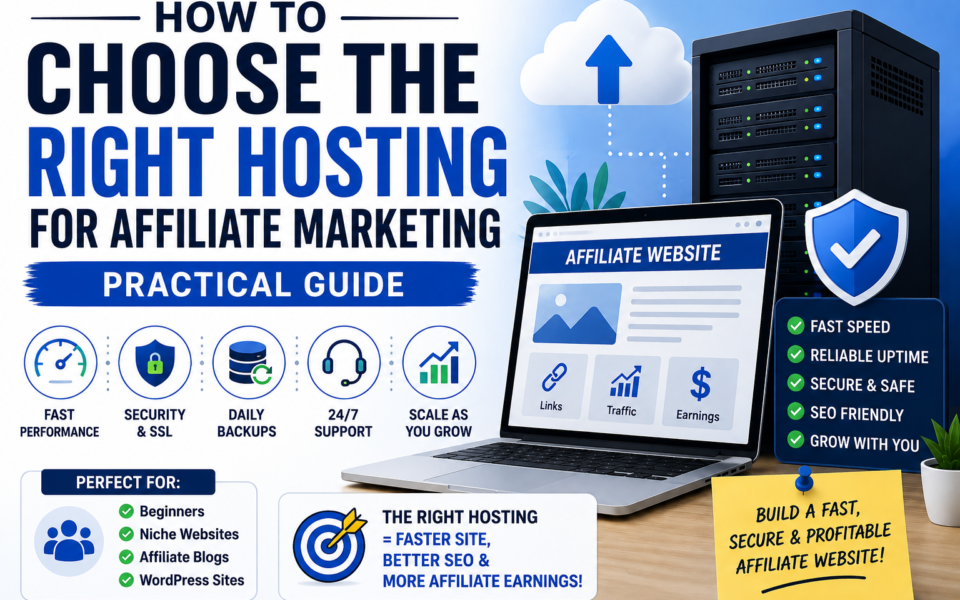
Picking the right hosting for affiliate marketing matters more than most beginners realize. Hosting affects site speed, uptime, security, and sometimes SEO — all of which influence conversions and affiliate revenue. This guide walks you through what hosting does, which features matter for affiliate websites, how much you should expect to pay, whether shared hosting is enough, and when to upgrade.
Quick answer: How to choose the right hosting for affiliate marketing
Choose hosting that prioritizes speed, reliability, security, and easy backups. For most affiliate beginners, a reputable shared or managed WordPress plan with free SSL and good support is enough. Grow into VPS, cloud, or managed business hosting as traffic and revenue increase.
Why hosting matters for affiliate websites
- Page speed and conversions: Faster pages convert better. Slow hosting adds milliseconds or seconds to page loads and can drop your affiliate clicks and commissions.
- Uptime and availability: If your site is down when users click an affiliate link, you lose potential sales and credibility.
- Security and trust: A hacked site loses reader trust and can get blacklisted by search engines or advertising partners.
- SEO performance: Hosting influences site speed, server response (TTFB), and security (HTTPS) — all ranking signals.
- Scalability and costs: Good hosting lets you scale without long downtime or manual migrations as traffic grows.
Does hosting affect affiliate marketing SEO?
Yes. Hosting affects SEO indirectly through speed, uptime, and security. Search engines use page load time and mobile performance as ranking inputs, and frequent downtime or slow server response can hurt visibility. Choose hosting that keeps TTFB low, supports the latest PHP versions, and makes SSL/HTTPS simple.
Types of hosting and when to use each
Shared hosting
One server, many sites. Cheapest option and often fine for new affiliate blogs with low traffic.
- Pros: Very affordable, easy to set up, includes basic features like one-click WordPress installs and free SSL.
- Cons: Limited performance, noisy neighbors, fewer server resources and slower CPU when other sites spike.
- Best for: Beginners, low-traffic niche sites, testing ideas.
Managed WordPress hosting
Hosting tuned for WordPress with performance and security features managed by the provider.
- Pros: Faster out of the box, automatic updates and backups, specialized support for WordPress optimization.
- Cons: More expensive than basic shared plans and sometimes plugin restrictions.
- Best for: Affiliate marketers who want less manual maintenance and faster sites without deep technical work.
VPS (Virtual Private Server) and cloud hosting
Dedicated chunk of server resources or scalable cloud instances.
- Pros: Predictable performance, scalable resources, more control over environment.
- Cons: Requires technical knowledge or managed support; higher cost than shared hosting.
- Best for: Growing affiliate sites with consistent traffic and custom requirements.
Dedicated server
Entire physical server for one account — overkill for most affiliate sites.
- Best for: High-traffic networks, large comparison sites, or when regulatory/compliance needs require isolation.
Can you start affiliate marketing on shared hosting?
Yes. Shared hosting is a common starting point for beginners. It’s low-cost and simple to set up. However, be prepared to upgrade when performance or uptime issues begin to affect traffic or conversions. Use providers with solid reputations and the option to upgrade easily.
What hosting features are important for affiliate websites?
Focus on features that directly affect speed, security, reliability, and SEO.
- Speed-related features
- Fast server hardware (modern CPUs, SSD storage)
- HTTP/2 or HTTP/3 and PHP 7.4+ / 8.0+ compatibility
- Built-in caching or compatibility with caching plugins
- CDN support or free CDN integration (reduces page load time globally)
- Reliability
- High uptime guarantees (99.9%+)
- Clear SLA and good historical reputation for availability
- Security
- Free SSL certificate (Let’s Encrypt)
- Web application firewall (WAF), malware scanning, DDoS protection
- Ability to enforce HTTPS and strong password policies
- Backups and recovery
- Automatic daily backups with easy restore
- Support and management
- Responsive support via chat or phone and knowledgeable WordPress help
- Staging environments for testing major site changes
- Scalability and resource clarity
- Transparent limits on CPU, memory, PHP workers, and bandwidth
- Simple upgrade paths (shared → VPS → managed cloud)
- Developer-friendly features
- SSH access, Git deploys, and control over PHP configurations (when needed)
How much hosting do you need for an affiliate website?
That depends on your traffic, content type, and complexity. Use these starting guidelines:
- New affiliate blog / niche site: 1–3 GB storage, 512MB–1GB RAM, shared CPU — often fits in a basic shared or entry-level managed plan.
- Growing site (10k–50k monthly sessions): 2–10 GB storage, 1–2 GB RAM, higher PHP workers — VPS or higher-tier managed hosting recommended.
- High-traffic site (50k+ monthly sessions): 10+ GB storage, 2–8+ GB RAM, dedicated resources or cloud architecture with autoscaling.
Also consider the number of concurrent users and PHP worker limits — affiliate pages that load many assets or run heavy plugins need more workers to avoid queueing.
How much should affiliate marketers spend on hosting?
Typical ranges:
- Beginner: $3–$12/month on shared or budget managed plans.
- Serious hobbyist / small business: $20–$60/month for reliable managed WordPress or a small VPS.
- Growing/professional: $80–$300+/month for managed business hosting, scalable cloud, or a properly managed VPS cluster.
Spend what aligns with expected revenue and risk. If a $30/month plan reduces page load times and increases conversion by a few percent, it can pay for itself quickly.
Best hosting for affiliate marketing beginners
Beginners should prioritize value, ease of use, and upgrade paths. Look for providers that include free SSL, easy WordPress installs, good support, and simple scalability. Several reputable hosting companies offer beginner-friendly plans that meet these requirements — choose one with a proven uptime record and accessible help.
Shared hosting vs managed WordPress hosting for affiliate marketing
- Shared hosting: Cheapest; good for proof-of-concept and very low traffic sites. Watch for resource contention and slower performance.
- Managed WordPress hosting: Optimized for WordPress performance, security, and convenience. Better for conversion-focused affiliate sites that need consistent speed.
If you value convenience, fewer technical tasks, and faster page speed out of the box, managed hosting is often worth the premium for affiliate sites.
Hosting features that directly boost affiliate performance
- Free SSL certificate: Essential for trust and required for many affiliate programs; also affects SEO slightly.
- Fast TTFB: Reduce server response time to help both SEO and user experience.
- CDN integration: Decreases latency for international visitors and speeds up asset delivery.
- Automatic backups: Prevent long recovery times after errors or hacks.
- Staging site: Test changes before deploying so you don’t accidentally break conversion pages.
- Uptime monitoring: Some hosts include or integrate easily with monitoring tools to alert you to outages.
Performance and optimization tips for affiliate websites
- Use a lightweight theme and avoid bloated page builders on conversion pages.
- Enable page caching (server-level preferred) and object caching for dynamic sites.
- Optimize images (modern formats like WebP) and lazy-load below-the-fold media.
- Serve assets via a CDN and use preconnect/prefetch for critical domains.
- Limit third-party scripts and review affiliate scripts that slow pages.
- Monitor Core Web Vitals and aim to keep Largest Contentful Paint (LCP) under 2.5 seconds where possible.
When should you upgrade your hosting plan?
Upgrade when performance or reliability starts to hinder growth. Specific signals:
- Page load times increase despite optimization.
- Frequent 503/504 errors or resource limit warnings from your host.
- Traffic consistently exceeds your plan’s recommended limits (e.g., concurrent users or monthly visits).
- Affiliate conversion rates drop during peak traffic times due to slowdowns.
- You need more control (SSH, custom PHP settings, staging, or server-level caching).
- Backups or security measures are insufficient for your content volume.
Security checklist for affiliate websites
- Enable HTTPS with a free or paid SSL certificate.
- Use strong passwords and two-factor authentication for admin accounts.
- Install a reputable security plugin or use host WAF and malware scanning.
- Keep WordPress core, themes, and plugins updated.
- Limit login attempts and change default admin paths if necessary.
- Regularly review user roles and remove unused accounts.
Choosing a host: a practical checklist
- Does the plan include free SSL and easy HTTPS setup?
- Are backups automatic and easy to restore?
- Is the host known for high uptime and fast TTFB?
- Does the plan support a CDN or include CDN credits?
- Are PHP, MySQL, and server versions current and upgradeable?
- Is support responsive and WordPress-knowledgeable?
- Are resource limits (CPU, RAM, PHP workers) clearly stated?
- Does the provider offer easy upgrade paths and migration support?
Common hosting myths — and the truth
- Myth: Cheaper is fine if content is great. Truth: Content matters, but slow or unreliable hosting can nullify good content by reducing traffic and conversions.
- Myth: You need the most expensive plan to rank. Truth: You don’t need top-tier hosting to rank, but you do need a fast, secure, and reliable setup.
- Myth: A CDN solves all speed problems. Truth: CDN helps, but origin server speed and TTFB still matter.
Final recommendation
Start with a reputable shared or entry-level managed WordPress plan that includes free SSL, automated backups, and straightforward upgrade paths. Prioritize speed (server-level caching, CDN support, PHP 8+), uptime, and security. As traffic grows, move to VPS, cloud, or higher-tier managed hosting before performance issues start to affect conversions. Invest a bit more in hosting when revenue is at stake — the right plan pays for itself by protecting uptime and improving conversion rates.
Quick action plan — 5 steps to pick and launch hosting for your affiliate site
- Decide your starting point: shared for testing, managed WordPress for conversion-focused beginners.
- Verify free SSL, backups, and upgrade options before buying.
- Choose a provider with good support and a clear performance record.
- Optimize WordPress: light theme, caching, image optimization, and a CDN.
- Monitor Core Web Vitals and server metrics; upgrade when resource limits are hit.
Choosing hosting is a practical tradeoff between cost and reliability. Focus on the hosting elements that directly affect speed, uptime, and security — those have the biggest impact on your affiliate income.
More from The Affiliate Digest
-
Tube Claw AI review: Features, pricing, is it legit or a scam?
Tube Claw AI promises an all-in-one AI toolkit for faceless YouTube channels: scripts, voices, avatars, SEO and uploads.…
-
Brett Rutecky’s Affiliate Store Review
Affiliate Store is a low-cost, no-code AI assistant for creating a simple affiliate storefront. It can generate product…
-
How to Get Traffic for Affiliate Marketing: A Beginner’s Step‑by‑Step Guide
Practical, step-by-step methods to get targeted traffic for affiliate marketing — free and paid options, SEO and content…
-
Aigency Valet Review — What Joshua Zamora’s Service Promises and Who It’s Best For
Aigency Valet is a marketing/agency support product marketed by Joshua Zamora that promises systems and assets to help…
-
Vidicom review: AI product videos for e-commerce (2026)
Vidicom is an AI video generator that creates studio-style product videos from a product URL. It’s designed for…