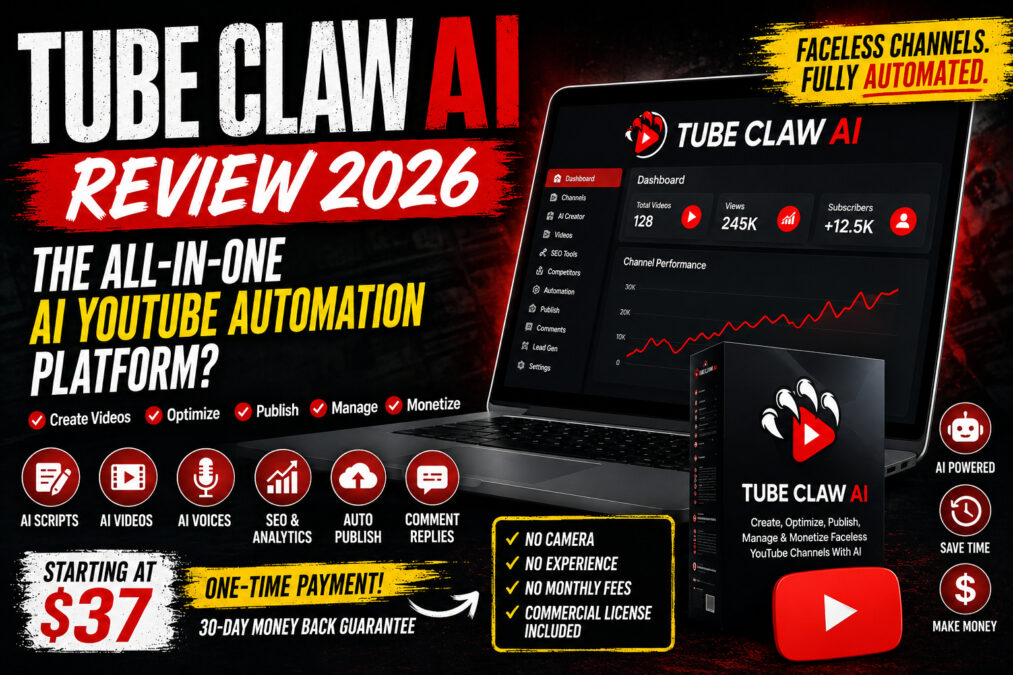
- Tube Claw AI may be worth cautiously testing as an inexpensive workflow‑consolidation tool, but it is not a guaranteed YouTube money machine.
- Good for producing first drafts, prototypes and faceless video demos; test outputs during the refund window before committing to upgrades.
- Be careful with automated publishing/commenting — YouTube policy and monetization rules can be strict about templated AI content.
Is Tube Claw AI legit or a scam? Short answer: Tube Claw AI is not an obvious scam — it’s a commercial SaaS product that bundles AI script writing, voiceovers, avatar/visual generation, SEO tools and channel-management features. However, many of the platform’s performance claims come from the sales copy; independent verification is limited. Treat it as a workflow tool that can speed drafts and prototypes, not as a push‑button income system.
What is Tube Claw AI?
Tube Claw AI is marketed as an all‑in‑one AI YouTube automation platform that helps users create faceless videos, generate scripts and voiceovers, research keywords, render videos, and (according to the vendor) manage channel uploads and engagement. The vendor positions it for beginners, affiliate marketers, freelancers, and agencies who prefer not to appear on camera.
How Tube Claw AI works (overview)
Vendor claims say Tube Claw AI combines several modules into a single cloud app. Typical workflow described on the sales material looks like this:
- Keyword research & competitor discovery: enter topic ideas to get video ideas and SEO suggestions.
- Script generation: AI writes a video script or multiple variations using supplied prompts or templates.
- Voiceover and avatars: text-to-speech (TTS) voices and AI avatars generate audio and on-screen presenters for faceless videos.
- Video assembly: templates and stock media are combined with script and audio to produce rendered videos and Shorts.
- Thumbnail and metadata: thumbnail templates plus title, description and tag suggestions for YouTube SEO.
- Publishing tools: a claimed integration to upload or schedule videos directly to YouTube and interact with comments.
I could not independently verify every claimed integration and automation step; many vendor details are promotional. Treat these as the advertised feature set rather than confirmed outcomes.
Key features (what the platform claims)
- Script generation: Multiple templates and prompt presets to create scripts in various niches and languages.
- AI voices and avatars: Text-to-speech voices, and animated or static avatars for faceless presentation.
- Video builder: Prebuilt templates, stock media libraries and automated timeline assembly for full-length videos and Shorts.
- SEO & research: Keyword suggestions, competitor keyword scraping and title/description recommendations for YouTube.
- Thumbnail creator: Simple thumbnail templates and variations intended to increase click-throughs.
- Publishing & channel tools: Claimed ability to upload videos directly, schedule publishing and manage comments (often gated behind upgrades).
- Commercial use positioning: The vendor markets the product with commercial/agency use in mind.
- Credits system: Usage is credit-limited on the front-end — e.g., the sales page notes an initial bundle of credits (10,000) with paid top-ups or upgrade for more usage.
- Cloud-based: No installation; everything runs in your browser according to the vendor.
- Languages & voices: Multiple languages, TTS voices and avatar templates claimed.
What is included with Tube Claw AI (front-end vs upsells)
The vendor structures the offer with a front-end entry product that includes core features but with credit and functionality limits. Upsells (OTO/upgrade paths) typically add:
- Higher or unlimited credits and rendering quotas.
- Advanced automation (scheduling, more direct publishing capabilities).
- Agency packs and commercial templates for client work.
- Priority support, extra voices/avatars or DFY (done-for-you) services.
Important: the front-end often covers basic script generation, a set of voices/avatars and limited renders. Critical functionality such as unlimited uploads, bulk automation or agency bundles may be in separate paid upgrades.
Does Tube Claw AI really automate YouTube channels?
Short answer: partially. Tube Claw AI appears designed to automate parts of the content-creation pipeline (script, audio, basic editing, thumbnails). According to the sales material, it can also publish and comment. However, real-world YouTube channel growth depends heavily on original analysis, editing, storytelling, human oversight, and policy compliance — areas where full automation is risky.
Key limitations to keep in mind:
- YouTube policies: mass-produced or templated content may be ineligible for monetization. Automated high-volume commenting can trigger spam rules.
- Quality control: AI drafts often need human editing for accuracy, voice, pacing and copyright clearance for stock assets.
- Integration limits: claimed direct-upload or scheduling features may be restricted to higher-tier upgrades or require YouTube API permissions.
Can Tube Claw AI create complete faceless videos?
Yes — in principle. The combination of AI script writing, TTS audio, avatars and automated rendering is intended to produce faceless videos without a camera. But ‘complete’ here usually means a basic, template-driven end product. The vendor promotes multiple languages, voices and avatars, but expect to perform additional editing, fact-checking and customization to avoid repetitive output and to meet YouTube’s content standards.
Can Tube Claw AI upload directly to YouTube?
The sales copy claims direct-upload and scheduling tools. From the available information, uploading and scheduling are either limited or reserved for paid upgrades. Also, direct upload requires you to grant YouTube API access and follow Google’s developer and account security policies — so expect confirmations and potential permission steps. Always verify upload functionality during the refund window rather than assuming it’s fully automated on the base plan.
Does Tube Claw AI include a commercial license?
The vendor markets the product for freelancers and agencies and states commercial‑use permissions. That suggests you can create client videos and sell services. However, read the vendor’s official terms of service and license agreement closely — especially regarding stock media, third-party voice models and avatar usage rights. Some voice/asset libraries restrict commercial redistribution or require attribution unless you pay for higher tiers.
What happens when Tank Claw AI credits run out?
When front-end credits are exhausted you’ll need to either buy more credits or upgrade to a plan that offers higher quotas or unlimited rendering. The vendor’s funnel prominently promotes credit top-ups and unlimited‑use upgrades. Plan your testing so you don’t run out during evaluation: render a few full videos and several Shorts in the refund period to measure average credit consumption.
Is the Tube Claw AI lifetime deal really lifetime?
Sales pages often promote a “lifetime” purchase. The vendor defines lifetime as the lifetime of the product and estimates approximately five years of support. That means lifetime may be limited by the product’s commercial existence and vendor support policies, not your lifetime. If long-term updates, voice model access or API integrations matter to you, consider this a caveat rather than a promise of indefinite updates.
Pricing and upsells explained
Exact prices on the checkout can vary, and the vendor has mixed front-end figures in sales copy versus checkout pages. Typical structure seen with similar launches:
- Front-end: a low one-time price or a low monthly fee that gives limited credits (e.g., 10,000) and basic features.
- OTO/upgrades: unlimited credits, advanced publishing automation, agency features, additional voices/avatars, DFY services, and priority support.
- Credit top-ups: medium-priced packages to buy more credits without upgrading to an unlimited plan.
- Refund policy: vendor states a 30-day money-back guarantee; use it to test the system thoroughly.
Recommendation: If you decide to buy, purchase the front-end only and test everything during the refund window. Don’t buy unlimited upgrades without confirming real usage and output quality.
Pros
- Combines content creation, SEO, competitor research and channel management into one platform (per vendor).
- Designed for people who prefer not to appear on camera — supports faceless video workflows.
- Lower initial cost than subscribing to multiple separate tools for scriptwriting, TTS, video rendering and SEO.
- Vendor positions it for commercial use (freelancers/agencies) and includes a credit system to control consumption.
- Cloud-based — no local software installation advertised.
- Offers a 30-day money-back guarantee (vendor claim).
- Potentially useful for prototypes, content testing and client demos.
Cons
- Marketing claims are aggressive — do not treat promises of automatic rankings or viral growth as verified outcomes.
- Front-end credit limits mean ongoing usage often requires buying credits or upgrading.
- “Lifetime” is vendor-defined and likely limited to the product’s market lifetime or a multi-year support window.
- Important capabilities (unlimited rendering, automation, agency tools) may be locked behind upsells.
- Price inconsistencies on sales pages and checkout pages have been reported in similar launches.
- Independent, reputable reviews and hands-on testing are limited — most search results are promotional.
- Automated production increases YouTube policy risk; templated AI content can affect monetization eligibility.
- Realistic synthetic media or voice cloning may require altered-content disclosure on YouTube.
Who Tube Claw AI is best for
- Beginners who want to prototype faceless video ideas quickly and have the time to edit outputs.
- Small agencies and freelancers who need a lower-cost way to generate first drafts for clients.
- Creators who want a single interface to assemble scripts, voices and basic video templates without buying many subscriptions.
- Anyone who will apply human oversight — edit scripts, fact-check, and adapt videos for originality.
Who should avoid Tube Claw AI
- People expecting fully automated, guaranteed monetized YouTube channels without manual work.
- Creators who require high-end custom editing, unique animations or brand-new voice models not offered in the product.
- Buyers who are unwilling to test the tool during the refund window and adapt outputs for quality or policy compliance.
Tube Claw AI vs alternatives
If your goal is faceless video creation, compare Tube Claw AI’s pitch to specialized tools:
- VidIQ / TubeBuddy: Primarily YouTube SEO, competitor analytics and channel tools. They excel at keyword research, tag suggestions and analytics but don’t create videos. Use them together with a video builder if you want strong SEO data.
- Pictory, InVideo, Lumen5, Synthesia, HeyGen: Focused video creation and AI avatars or TTS. These tools may offer higher-quality rendering, better voice models or stronger template libraries but require combining with an SEO tool.
- Descript: Superior for editing, overdub voices and transcript-based video editing — better if you want precise post-production control.
Which to choose: If you need an all-in-one, low-cost entry point, Tube Claw AI claims to consolidate multiple steps. If you need best-in-class voice quality or editing control, use specialized tools and pair them with vidIQ/TubeBuddy for SEO.
Practical testing checklist (what to test before committing)
Use this checklist inside the refund period to decide whether to keep Tube Claw AI or request a refund:
- Create three full-length videos and five Shorts; compare quality and credit usage.
- Evaluate script originality and factual accuracy — does the AI invent facts or repeat clichés?
- Test voice and avatar realism and whether they fit your brand and languages required.
- Measure render time and how many credits each output consumes on average.
- Assess thumbnails, title and description suggestions for click potential and SEO logic.
- Confirm direct YouTube integration — can it upload and schedule as claimed? Are permissions straightforward?
- Test comment and publishing tools — check for safety and whether automated commenting is limited or requires human moderation.
- Rate support responsiveness and whether documentation answers integration questions.
Tube Claw AI refund policy
The vendor states a 30-day money-back guarantee. Use that window to complete the checklist above. If the vendor offers credits and you quickly expend them, request a refund before the guarantee period closes if you’re unsatisfied.
Is Tube Claw AI a scam?
There’s no indication that Tube Claw AI is outright fraudulent. It is a commercial SaaS product that appears to deliver some or most of the advertised technical features. The primary caution is marketing style: the sales pages make strong growth and income implications that are not guaranteed by the software itself. The responsible interpretation is that Tube Claw AI is a legitimate tool with legitimate limitations; evaluate it with a test-first mindset.
Final recommendation
Short version: Buy only the front-end first, test thoroughly, and use the 30-day refund period. Do not assume full automation or guaranteed monetization.
Why: The product can consolidate multiple subscriptions into one low-cost entry, which is useful for prototyping and client demos. But key capabilities (unlimited automation, agency packs, uploads) may be upsold, and AI outputs typically require human review to be original and monetizable. If you need a long-term, production-grade pipeline for client work, plan to combine Tube Claw AI with specialized tools or human editors.
FAQ
Is Tube Claw AI worth buying?
It can be worth testing as a low-cost way to generate first drafts and prototypes, especially if you’re building faceless videos and want to avoid multiple subscriptions. Don’t buy expensive upsells before testing the front-end during the refund window.
How does Tube Claw AI charge — credits, subscription or lifetime?
The vendor sells a front-end product with a credits bundle (advertised as 10,000 credits) and promotes one-time upgrades and add-ons. Pricing messages are inconsistent across marketing pages and checkout, so verify the exact cost at purchase time. Expect credit top-ups and OTOs for unlimited usage.
Can Tube Claw AI be used commercially for client work?
The vendor positions the product for commercial use. Still, confirm license details in the official terms and any voice/asset usage limits before selling videos to clients.
Will Tube Claw AI get my channel demonetized?
Not necessarily, but be careful. YouTube can limit monetization on repetitive, mass-produced or templated AI content. Add original commentary, editing and fact‑checked content to reduce policy risk.
Are there better alternatives?
For SEO and channel analytics, VidIQ and TubeBuddy remain the standards. For higher-fidelity avatars or TTS, Synthesia, Descript and HeyGen can outperform generalist platforms. Choose based on whether you prioritize creation, SEO, or post-production quality.
What happens when credits run out?
You must either buy additional credits or upgrade to a higher-tier plan. Test typical credit consumption early to avoid surprise costs.
Does Tube Claw AI provide real human voices?
It offers text-to-speech voices. Voice quality can vary; some voices may sound synthetic and need adjustments. Confirm which voices are included and whether premium voices are gated behind upgrades.
Disclosure
I may earn an affiliate commission if you purchase Tube Claw AI using the links in this review. This review is intended to provide an independent, practical look at the product’s claimed features, limitations and recommended testing steps. Do your own evaluation during the refund window before committing to any upsells.
More from The Affiliate Digest
-
Brett Rutecky’s Affiliate Store Review
Affiliate Store is a low-cost, no-code AI assistant for creating a simple affiliate storefront. It can generate product…
-
How to Get Traffic for Affiliate Marketing: A Beginner’s Step‑by‑Step Guide
Practical, step-by-step methods to get targeted traffic for affiliate marketing — free and paid options, SEO and content…
-
Aigency Valet Review — What Joshua Zamora’s Service Promises and Who It’s Best For
Aigency Valet is a marketing/agency support product marketed by Joshua Zamora that promises systems and assets to help…
-
Vidicom review: AI product videos for e-commerce (2026)
Vidicom is an AI video generator that creates studio-style product videos from a product URL. It’s designed for…
-
LeadHunterXAi — Can this AI lead tool really find verified leads?
LeadHunterXAi promises instant, verified emails and phone numbers from social platforms and Google Maps. This review breaks down…